SpaceX Rideshare Payload Test Requirements and Shaker Sizing
What the SpaceX Rideshare test requirements cover
The SpaceX Rideshare test requirements are set out in the Rideshare Payload User’s Guide, and working out which of them apply to your payload means cross-referencing mass bands, interface types and verification approach across a hundred pages. This planner does that for you. Tell it what you’re flying and how you plan to qualify it, and it shows which environmental tests are required, which are advised, and what levels and durations apply — then sizes the shaker force, stroke and velocity your campaign needs. Built against version 11, August 2026.

You need this size shaker
The governing requirement across the tests you have ticked, on your total moving mass. Every figure is what the machine has to deliver at the armature.
Shaker sizing, test by test
The same numbers broken out by test, so you can see which one drives which limit.
Random vibration
Sine — low-level survey and full level
Sine burst — quasi-static load
Random vibration spectrum
Test matrix and campaign scope
| Run | Test | Per the guide | Level | Duration | Ref |
|---|
Tick what this campaign will run in house; the sizing above follows your selection. The status column always shows what the guide says and never changes. “Required” tests protect the launch vehicle and co-payloads and gate your flight. “Advised” tests protect your own mission, and skipping one means acknowledging the risk in the summary report.
Sections that apply to you
Greyed rows are the ones you can skip for this configuration.
Other important considerations
Unofficial tool. This page is a navigation aid built from the publicly released Rideshare Payload User’s Guide, version 11 (August 2026). It paraphrases requirements and reproduces the numeric levels needed to do the arithmetic; it is not a substitute for the guide, and it carries no SpaceX endorsement. The guide is SpaceX’s copyrighted work — read the current release at spacex.com/rideshare and design to that. Levels change between versions.
Force figures ignore fixture dynamics, amplification at resonance, notching, and slip-table friction, all of which move the answer. Random force is quoted RMS, to compare against a shaker’s random rating; sine and burst forces are peak, to compare against the sine rating.
Prepared by PEAK-G LLC — distributor of precision test and measurement equipment.
Sizing a shaker for rideshare payloads
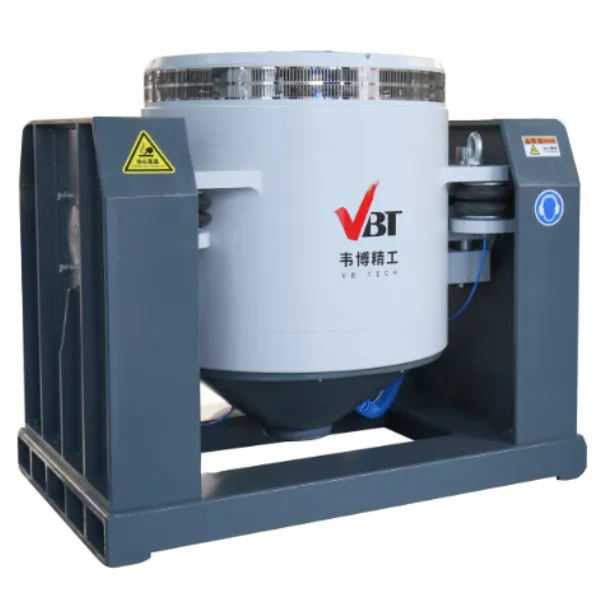
Rideshare-class payloads run from a few kilograms to several hundred, and the shaker that fits is usually larger than people expect — not because the random level is severe, but because the quasi-static test isn’t.
The sine burst usually sets the size, not random vibration. At 5.57 Grms the rideshare random environment is mild by spacecraft standards. The quasi-static load factors are not. A 150 kg payload sits in a band calling for 10 g axial and 13.5 g lateral, and protoflight multiplies that by 1.25. Put that payload on 45 kg of fixturing and a 40 kg armature and the sine burst demands about 39 kN, while random asks for 18 kN.
Four ratings matter, and they aren’t interchangeable. Sine peak force covers the burst and the sine sweep. Random RMS force covers the vibration test, and because Grms is an RMS quantity it must be compared against the random rating rather than the sine figure. Shock peak covers transient work and is typically quoted 25 percent or more above sine. Armature moving mass is the fourth, it’s accelerated along with your hardware, so it comes out of your force budget: a 40 kg armature under a 150 kg payload and 45 kg of fixturing is about 17 percent of the moving mass, and therefore 17 percent of the force.
Stroke is the constraint people miss. Force is flat across a sine sweep, but displacement rises with the square of the falling frequency. The advised sine sweep runs down to 5 Hz, and at protoflight levels that needs roughly 37 mm peak to peak. That rules out every 25 mm (1 inch) system regardless of how much force it makes. If the sine sweep is in your scope, check stroke along with force.
Three axes means fixturing, and fixturing means mass. Vertical runs on the armature or a head expander; the two lateral axes need a slip table or a rotation fixture. A high CG on a slip table can be the limit long before force is.
Check the controller against the notching rules. Version 11 of the user’s guide tightened this considerably. Notching is capped at the quasi-static limit loads times 1.0 for every test including protoflight. Interface force limiting is the preferred method and is bounded to 200 Hz, and nothing may be notched above 200 Hz by any method.
Force limiting needs force gauges at the interface and a controller that supports limit channels. If your test house can only do manual notching, Table 6-6 constrains the bandwidth you’re allowed — and a payload whose primary mode is above 200 Hz can’t be notched at all.
Facility questions come into play. Amplifier power, three-phase supply, and cooling — forced air on the smaller systems, water on the larger ones. Then floor loading, and a seismic mass if the system is big enough to need one.
Run your configuration through the planner above and it will give you the governing force, the stroke, the peak velocity and the acceleration your system has to reach, broken out by test. Send us the results and we’ll quote against them.
Simulate Testing with RULA’s vibration controller software
Download RULA Technologies TestUP software to calculate the force, acceleration, velocity and displacement needed for all test modes including sine, random, shock, SRS, sine on random, random on random and more. Select your test type, shaker, test mass and enter the test profile details. The software will calculate the required acceleration, velocity and displacement requirements, and based on the selected shaker system let you know if you’re within the shaker limits. The maximum force is calculated using the test mass vs acceleration values.
This is a free tool. Click the link below to register and download TestUP software today!